

Maintaining consistent and complete product data across articles, references, and linkages is a daily challenge for many manufacturers. The latest TecDoc ONE updates address this challenge with new features that simplify data maintenance, reduce manual work, and support reliable, high-quality catalogue data.
Feature Highlights: What’s New in TecDoc ONE
The Q4 release introduces several enhancements designed to simplify article maintenance and support consistent data quality.
360° Images: Manage Spinning Image Sets Directly in ONE
With the new 360° Images functionality, users can now manage and transmit spinning image sets directly from the Asset Manager in TecDoc ONE to the TecDoc Catalogue.
This enables a more integrated handling of visual product content, reduces system switches, and ensures that complex image assets are consistently linked to the correct articles. The result is a more efficient workflow and an improved presentation of products in the catalogue.
Copy OE and Cross References: Reduce Manual Effort
Maintaining OE and cross references across multiple articles can be time-consuming and error-prone. The new Copy OE / Cross References feature allows users to quickly copy references from one article to another. This not only saves time but also helps ensure consistency across the dataset, especially when managing similar products or variants within a portfolio.
Copy Linkages: Reuse Existing Structures Efficiently
The new Copy To function in the Linkages area allows users to reuse existing linkages, including attributes, assets, and text blocks. Instead of recreating linkages from scratch, users can build on existing structures, significantly reducing manual work while maintaining a consistent data model across articles and target types.
Tip & Trick: Linkage Variants for Clearer Catalogue Structures
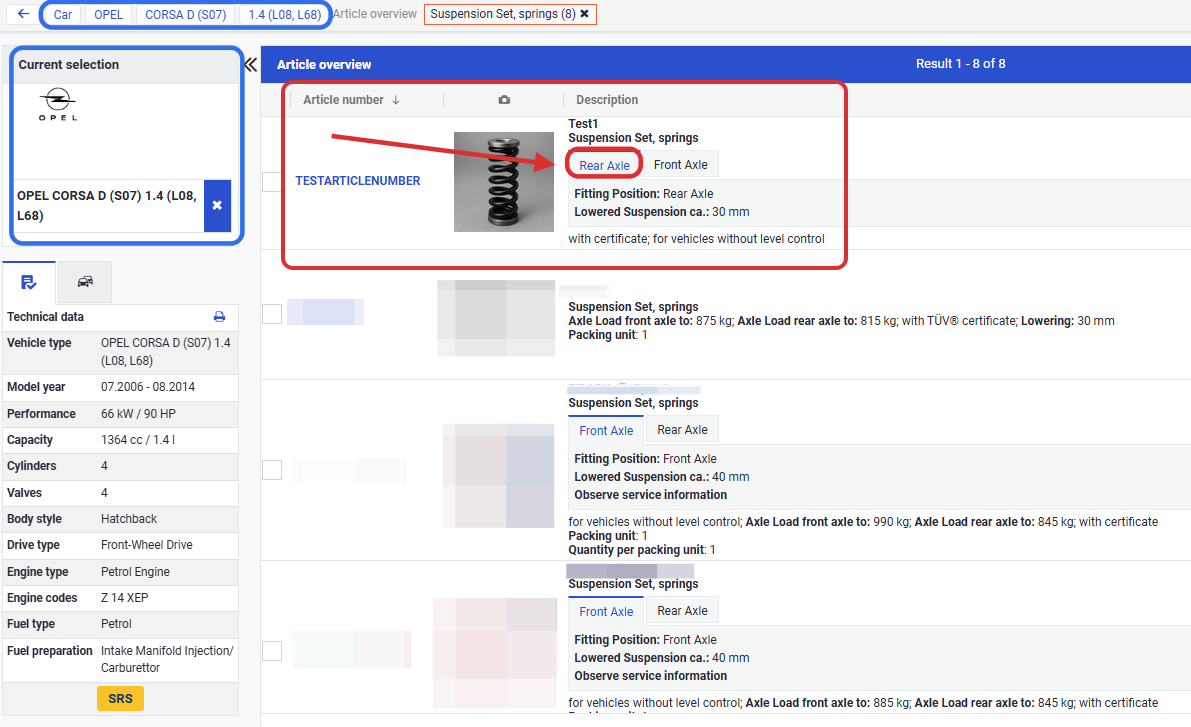
Beyond new features, TecDoc ONE also offers powerful options to structure catalogue data more clearly. With linkage variants, users can create multiple variations of the same linkage and display them in separate tabs in the TecDoc Catalogue. Attributes, text blocks, and assets can be grouped logically while still remaining connected to the same core linkage. This improves readability for catalogue users and supports a clearer presentation of complex product information.
Want to learn how to set up and manage linkage variants in ONE? Read the full guide.
Ready to Explore TecDoc ONE?
Would you like to learn more about the new TecDoc ONE features? Explore TecDoc ONE in practice or reach out to or reach out to our support team here if you have any questions about the functionalities or the migration to TecDocONE.